MbedTLS 3.6.5 Windows “Visual Studio 2026” build for eosal library
The eosal repository contains ready static precompiled mbedTLS libraries for Windows. If it is acceptable to use precompiled mbedTLS, there is no need to do anything to enable TLS.
The 64 bit .lib files are in C:\coderoot\eosal\dependencies\windows\lib_win64_vs folder and 32 bit C:\coderoot\eosal\dependencies\windows\lib_win32_vs folder. Corresponding include headers are in C:\coderoot\eosal\dependencies\windows\include\mbedtls folder.
In Windows, all necessary mbedTLS components are in one single library: The mbedTLS.lib is release version and mbedTLSd.lib is the debug version.
Note:Select C++ and Python packages in Visual Studio 2026 installer: Select “Desktop Development with C++” and select “Python Development” and manually select all subitems
Download mbedtls-3.6.5.zip from MbedTLS github releases page.
Create folder C:\Users\<user>\mbed-tls-build and unzip mbedtls-3.6.5.zip into it.
Problem, trunkated file name ‘FStar_UInt64_FStar_UInt32_FStar_UInt16_FStar_UInt8.h’. Search for ‘FStar_UInt64_FStar_UInt32_FStar’ in you should see one file name cut short. Rename it with full name.
From Visual Studio [File][Open][Project]/solutin, select C:\Users\<user>\mbed-tls-build\mbedtls-3.6.5\visualc\VS2017\MbedTLS.sln
Change runtime library to Multithreaded (/MT) or Multithreaded Debug (/MTd) for debug builds. This is used by iocom related packages.
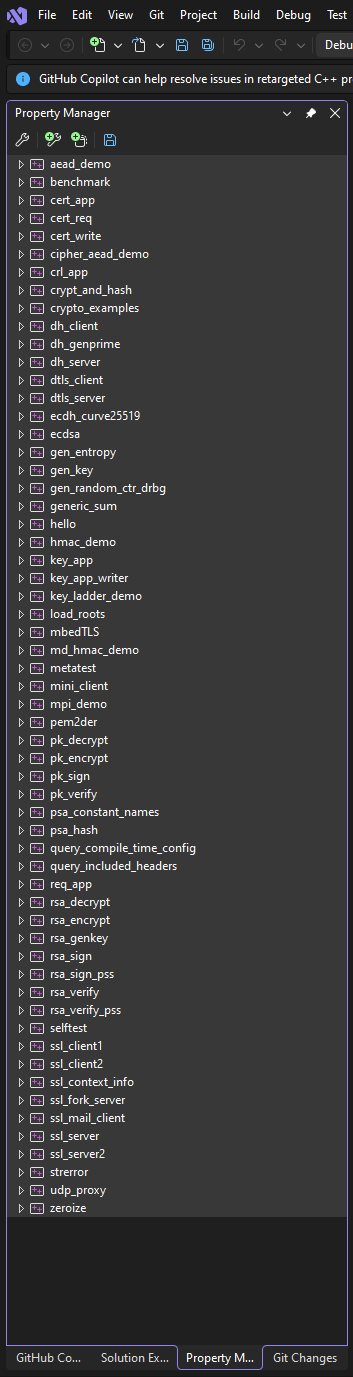
“Select all projects in solution explored, right click, select properties.
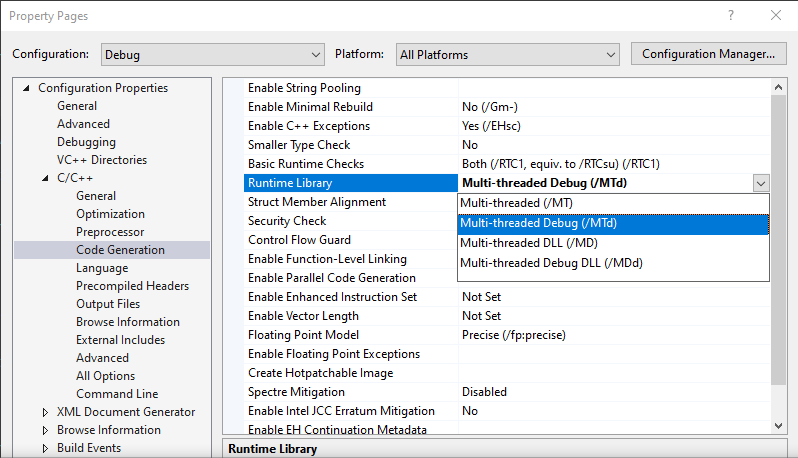
“Select configuration Debug and Platform “all platforms”. Runtime library is in C/C++, Code Generation tab.”
Similarly you can change Debug information format to C7 compatible for 32/64 bit debug builds, so .lib will include debug information and .pdb is not needed.
In Visual Studio, select the appropriate configuration (e.g., Release or Debug) and platform (e.g., x64 or Win32). Debug information format is in C/C++, General tab. You may change also Debug Information format to None for all release builds.
Build the solution from the Build menu. This will compile the static library.
Copy library mbedTLS.lib, debug/releases, 32 and 64 bit. Copy C:\Users\<user>\mbed-tls-build\mbedtls-3.6.5\visualc\VS2017\x64\Debug\mbedTLS.lib -> C:\coderoot\eosal\dependencies\windows\lib_win64_vs\mbedTLSd.lib (notice ‘d’ added to library name for debug).
Copy C:\Users\<user>\mbed-tls-build\mbedtls-3.6.5\visualc\VS2017\x64\Release\mbedTLS.lib -> C:\coderoot\eosal\dependencies\windows\lib_win64_vs\mbedTLS.lib.
Copy C:\Users\<user>\mbed-tls-build\mbedtls-3.6.5\visualc\VS2017\Debug\mbedTLS.lib -> C:\coderoot\eosal\dependencies\windows\lib_win32_vs\mbedTLSd.lib (notice ‘d’ added to library name for debug).
Copy C:\Users\<user>\mbed-tls-build\mbedtls-3.6.5\visualc\VS2017\Release\mbedTLS.lib -> C:\coderoot\eosal\dependencies\windows\lib_win32_vs\mbedTLS.lib.
Copy include header files for use. Copy mbedtls and psa directories from C:\Users\<user>\mbed-tls-build\mbedtls-3.6.5\include to C:\coderoot\eosal\dependencies\windows\include
260222, updated 25.2.2026